
Departing first is Question Three:
What role does the teacher librarian play in promoting and supporting inquiry learning in the primary school environment?
Using quotations for exact matches, my first simple search returned 1,200,000 useless and irrelevant hits:
A free upgrade to Boolean operates (AND and OR) narrowed my results to 16% of the original hits, with more relevant content.
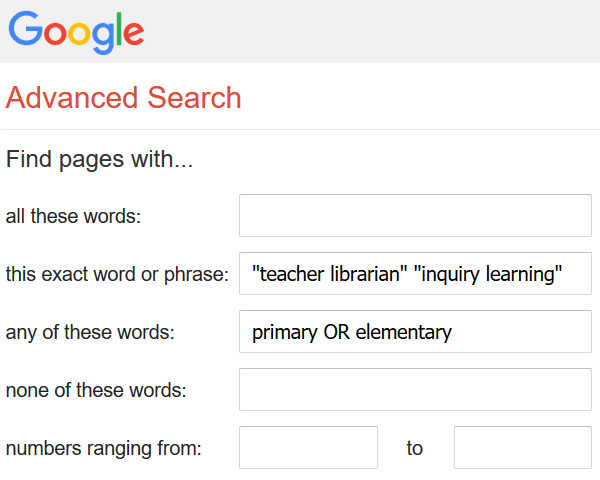
(Left) Image 3.1. Screen cap of Google’s Advanced Search tool.
After travelling via direct string entry, Advanced Search needed a test flight. Located under Settings, you complete a form (guidance is provided). This simple execution makes it ideal for beginners.
Using the same string conditions, I logged my key words and checked into the results page. Most results remained the same. What was different, however, was the executed search string:
 (Above) Image 3.2. Screen cap of the Google search bar depicting the odd use of Boolean operators converted from Advanced Search.
Advanced search reproduces strings in a non-logical pattern. When returning to edit, my entries were modified: “inquiry learning” moved to the top and “teacher librarian” lost its quotation marks.
Conclusion: Avoid Google Advanced Search and use string entries. If absolutely necessary, limit to single words.
Return Trip to Direct String Entry
Changing the terminology [whole-school approach] and excluding unnecessary websites [-thinkspace.csu.edu.au] in search two reduced job vacancy/description matches, and increased the results range to include general and academia pages. Altering concept terminology can bolster your hit accuracy and make searching more successful.
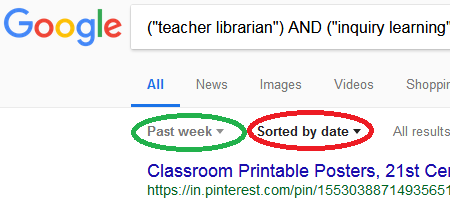 (Right) Image 3.3. Screen capture of Google filtering tools, where you can select a result’s timeframe, and sort by date order.
Currency is important, as you want data to reflect current views and practices. Google’s date tool can narrow results to within hour.
My nerdy searches did result in a website about classroom bullying, which sparked a further question:
How can inquiry learning be used to explore social issues relevant to today’s youth?
Despite its great service to the inquiry flight, I lost interest in this idea. Question Three is now being retired.
Question One will be captaining the next focus:
How does inquiry learning strengthen and change a primary school student’s engagement with a learning topic?
Mid-Air Emergency
I wanted to upgrade to Advanced Search, but its location was unclear. This was frustrating. Viewing YouTube I found an outdated video, then resorted to Google. It transpires a recent interface update downgraded Advanced Search from a window seat to a middle row seat (main menu). To teach well, you need to know your platform in detail, including keeping up-to-date with new changes and functions.
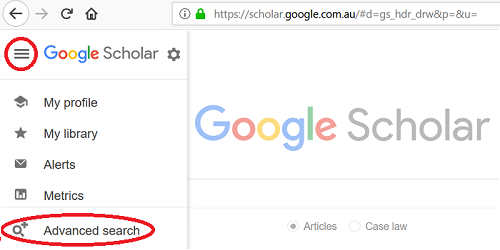 Image 3.4. Google Scholar screen cap showing how to access the advanced search feature
Whilst riding out this mid-air turbulence, I came across a future website resource: Musings about Librarianship.
Flight Diversion
WITH FILTER: SINCE 2014
Results appeared featuring the benefits to social and emotional learning during inquiry, and it prompted refinements to Question One:
How does inquiry learning strengthen and change a primary school student’s *social engagement with *peers? a learning topic?
Google Bubble
As part of Google, I considered if Google Scholar might apply the same search and rank algorithm, and if word positioning would influence my results. So, using the same key concepts, I tested my search string two ways:
The results were different! Of the top five results, two pages appeared on both lists, but all in different orders.
Implication: Word positioning, in Google-related platforms, is crucial, as priority will be given to the first term.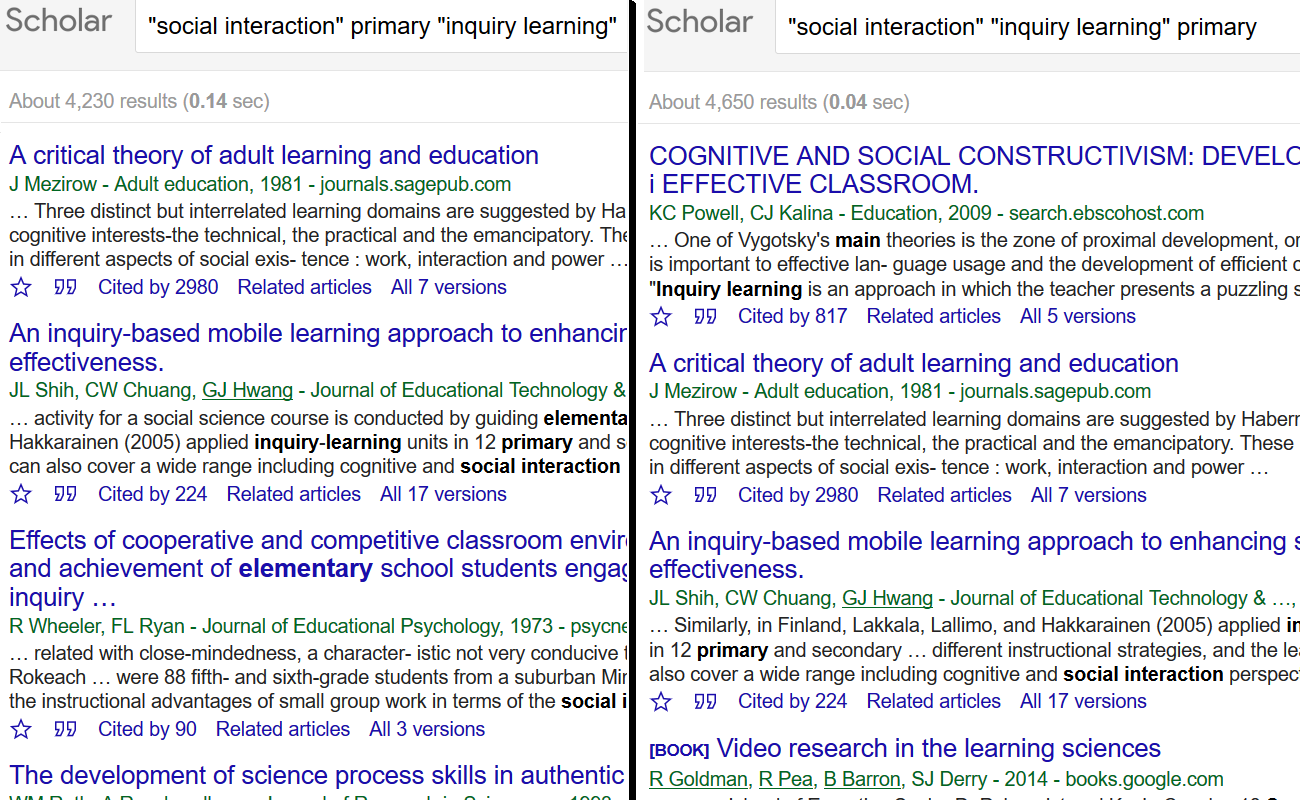
Image 3.5. Screen cap showing the results from the same search string in a different order in the search.
Serendipity
When testing Scoop.It’s capabilities, I ‘scooped an article and tagged it. Based on the tags, suggested curations appeared, including the article: 10 ways that digital age teachers model digital literacy and leadership, within the iGeneration – 21st Century Education (Pedagogy & Digital Innovation) collection. This sparked another question:
How can technology be used to further the inquiry learning process?
With a background in web application development, I love coding and writing functions. So, naturally, I enjoyed the search process a little too much! Check out the super nerdy Google and Google Scholar searches here (GG) and here (GS). Top three searches, highlighting the importance of how knowing what you do not want, is just as important as knowing what you do want:
-science FILTER: SINCE 2017
Google results can be hit and miss, but provide mainly open access resources. Google Scholar can be targeted slightly; Results are unpredictable, but again generally useful. Despite large hits, the initial few pages of both provided sufficient content. The systems foster ambiguity with the lack of thesaurus and standardised cataloguing. Google and Google Scholar are your low-fare, no-frills airline. A basic service gets you from A to B, but you have little control over how that experience unfolds.
Throughout this flight, new for inquiry learning terminology became evident. Additional terms to consider in future searches:
guided inquiry learning
inquiry based learning
Questions One and Two have now been streamlined:
How does inquiry learning strengthen and change a primary school student’s social engagement with peers?
What are the possible challenges encountered by teachers or students when implementing inquiry learning in the primary school classroom?
– – – – – – – – – –
Wow! What a thorough commentary on the processes that were used when accessing Google! I enjoyed being escorted through the process (almost as if a flight attendant was holding my hand) and the distinctive headings provided a clear indication of the journey that was undertaken as you tackled this flight. I really like the detail that was used to describe how you searched with Google and discovered aspects that I hadn’t actually considered. Your layout also allows for cohesion in your description that makes this very easy to read. I wish that I had your skills in coding! If I was to suggest anything to help, perhaps a final proofread, for example, the use of effect instead of affect. Overall though, a very interesting and engaging post that will benefit many fellow teachers who wish to embark on my beneficial ‘flights’ in their own inquiry endeavours.
Thank you for your feedback Jody, and I am glad you enjoyed the ride! Will fix up the issues mentioned.